"We'd like to automate that with AI." That one sentence can cover quite different things. Automation and AI agent are sometimes used as if they meant the same thing. In this article, I'll try to draw the distinctions with a few examples.
Level 1: classic automation
The example: a visitor fills out the "Request a quote" form on your website. The site sends you an email containing the form fields. An automated job reads that email, extracts the name, email, phone number and message, creates the record in your CRM, and notifies the rep for that territory.
There's no artificial intelligence here — and none is needed. The email always arrives in the same format, because your own form generates it. The program knows exactly where to find each value, because you told it.
That rigidity is its strength: you can process very large volumes at very low cost. It's also its limit: the day the format changes — a field added, an email typed by hand by a customer who couldn't find the form — the machinery stops dead.
Level 2: AI-assisted automation
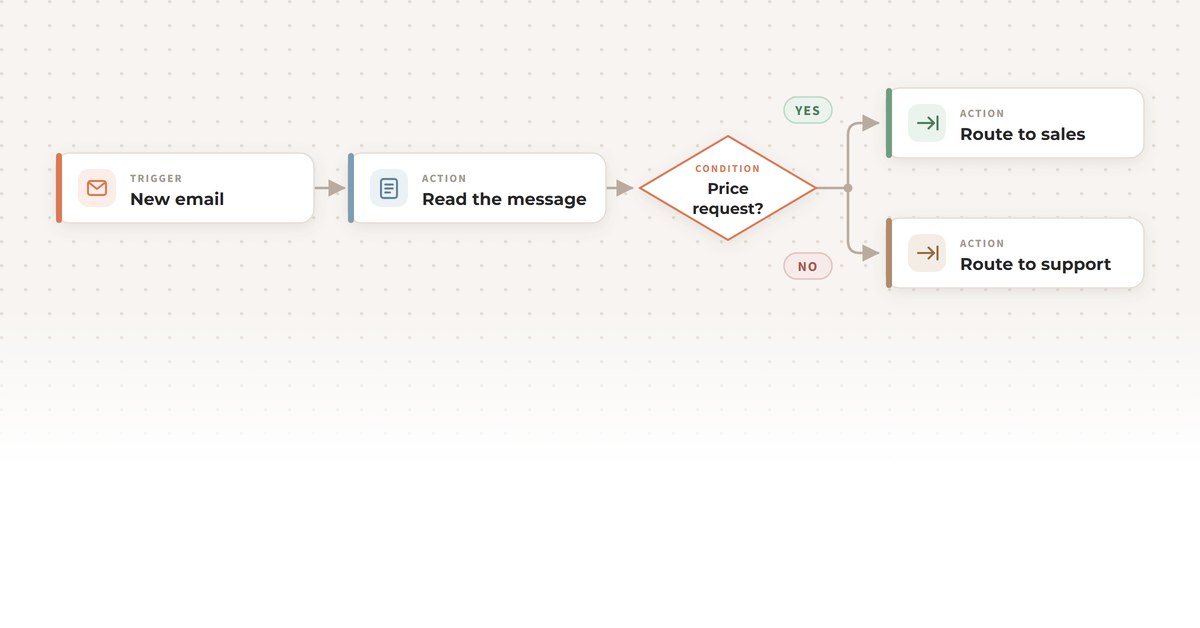
The example: your general [email protected] address receives all sorts of requests: price requests, technical problems, billing questions, sales pitches, résumés. Someone has to read each message and forward it to the right person. That kind of sorting can be handed over to AI.
What changes from level 1 is subtler than it looks. The flow stays fixed, because you are still the one who drew the path, and it never varies. Only, it's the AI doing the sorting, and the rule is fuzzier.
Before AI, we coded that classification with keywords — "invoice" goes to accounting, "bug" to support — and it broke constantly. The AI, on the other hand, reads the message and grasps the intent, in any phrasing, in French or in English, typos and all.
So you keep the predictability of a formal process while tolerating unpredictable inputs. What the AI does here is routing: it applies a one-off judgment inside a deterministic process.
Level 3: the AI agent
The example: at the [email protected] address, you install an AI agent. You no longer give it a step to execute, but a mandate: properly handle everything that lands in this mailbox, from first contact to entering the candidate in the recruiting system.
In practice, a custom AI agent connected to that mailbox can:
- answer the person asking which positions are open, based on your actual postings;
- read the résumé attached to an application and extract the background, the skills and the years of experience;
- assess that profile against the requirements of the target role and write a short summary for your HR team;
- create the candidate's record in your ATS (applicant tracking system), attach the résumé and log its assessment;
- acknowledge receipt to the candidate, ask for the missing information, and pick the thread back up when they reply three days later.
The fundamental difference isn't that it does more. It's that the order of operations is no longer written in advance. Two emails come in: the first is a simple question about open roles, and the agent answers it, full stop. The second contains a résumé for a position; the agent notices and files the application in the ATS. Nobody coded those two scenarios: the agent chooses its own sequence based on the goal and on what it is given.
To do that, it leans on the two capabilities we've covered before: a knowledge base — your job postings, your hiring criteria, your HR policy — and tools, that is, gateways to your ATS's API.
That freedom is dosed. You choose what the agent may do on its own (reply, classify, create a record) and what requires human sign-off (inviting someone to an interview, rejecting an application). The hiring decision stays human; the agent removes the handling work around it.
What actually changes from one level to the next
The higher you go, the more real-world messiness you can absorb — and the more AI there is. No level is "better" than another; each is more or less suited to the need.
- Classic automation: you decide everything, in advance. The input must be structured and stable.
- AI-assisted automation: you decide the path, the AI settles one specific question along the way. The input can be free-form and unstructured.
- AI agent: you set the goal and the boundaries, the agent decides the steps, chains them together and converses until the mandate is fulfilled.
So which one do you need?
The rule we apply with our clients is simple: don't pay for more than you need. If the input is structured and there's only one path, classic automation will do the job for a fraction of the cost.
As soon as the raw material becomes text (or an image) whose shape varies, AI earns its place. And when a task requires chaining several actions in a variable order, across several systems, while conversing with someone, then you're looking at a genuine mandate for a custom AI agent.
Not sure which level fits one of your processes? That's the kind of question we untangle in a single conversation. Let's talk.
— Frédéric Brabant